
By Paulius Petravicius
At the Spotter customer portal steering meeting, the new finance lead asks why single sign-on disappeared from release 1. The PM searches minutes, chat and an old slide. Three people remember three versions. Twenty minutes go on re-arguing a choice that was settled months ago. A decision log template would give that answer a permanent home.
On the Spotter booking-service trial, Sam opens D-006. In thirty seconds, the sponsor can see who approved the fallback environment, why, which alternatives lost, and the acceptance checks still required. Spotter, Sam and the team are fictional teaching characters, not a real project or client. These timings illustrate the contrast; they are not measured results.
The difference is not memory or effort. Sam keeps a standing list with the right columns, and reads each decision back for two minutes before the meeting ends.
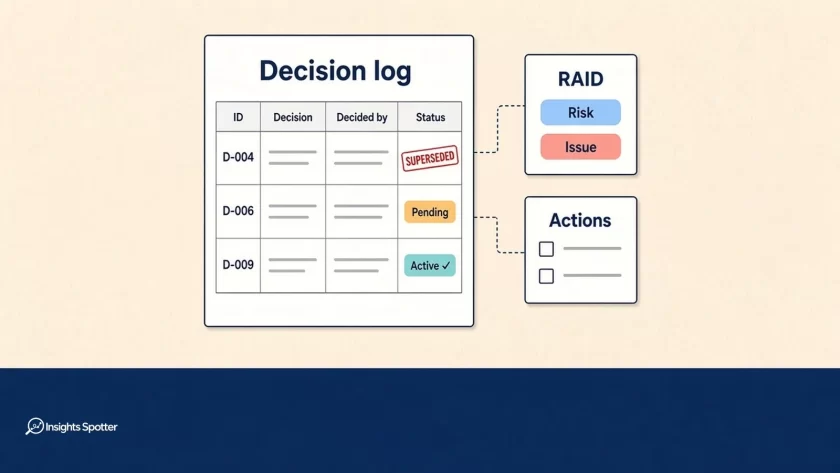
Every project keeps a decision log next to the RAID log and the action log. It records outcomes and authority, not discussion. It is the cheapest audit trail you will ever keep.
On my projects the decision log isn’t optional, and neither is the action log. Both sit next to the RAID log from the first week.
Education note: This is a practitioner’s working model, not a standard. PMI, PeopleCert (PRINCE2) and APM do not prescribe a single decision log format or these exact columns. The fields below are InsightSpotter editorial choices, assembled from common practice and public sources; adapt them, and follow your organisation’s governance first.
The failure is familiar. Margaret Love’s PMI paper on project logs describes undocumented decisions being argued over again months or years later. A project decision log preserves the reason while the people and evidence are still available.
Copy this decision log template
This compact view uses ten columns. Copy the table into your shared workspace and keep the full thirteen-column header below for your decision register. The two filled rows are fictional examples, shown at the 30 October review before that day’s condition check. Ruth is the sponsor’s fictional name in this extension of Sam’s case.
| ID | Date decided | Decision | Context / trigger | Options considered | Rationale / evidence | Decided by (authority) | Conditions | Linked actions | Status |
|---|---|---|---|---|---|---|---|---|---|
| D-006 | 2026-10-22 | Approved fallback environment for a staff-only trial if the supplier environment was late | R-014; I-009 linked on 23 October after the delay occurred | Wait: loses test time; do nothing: testing stays blocked; public trial: rejected because acceptance evidence is incomplete | Protect trial learning while restricting exposure; readiness pack section 3 | Ruth, sponsor, under delegated trial-approach authority | Mandatory acceptance checks must pass before trial start; Noor coordinates evidence and technical-lead sign-off; check 2026-10-30 | A-021 | Conditions pending |
| D-009 | 2026-10-30 | Approved moving planned go-live to 9 December 2026, staff-only first; supersedes D-004 | CR-003; requirement REQ-017; I-009 | Keep 2 December: insufficient test window; cancel: rejected because a staged release remains viable | Revised test plan preserves the acceptance window; change assessment CR-003 | Project board chaired by Ruth, acting within approved schedule-change authority | No new condition on the date change; D-006 acceptance gates still bind trial start | A-026; A-027 | Active |
On a phone, swipe the table sideways to see all ten columns.
ID,Date decided,Decision,Context / trigger,Options considered,Rationale / evidence,Decided by (authority),Consulted,Conditions,Linked actions,Status,Source / record,Review / revisit triggerThe full header adds Consulted, Source / record and Review / revisit trigger. Import the comma-separated header into Excel or Google Sheets, selecting comma as the delimiter. Keep dates in YYYY-MM-DD form. The RAID log template has the RAID sheet and weekly review guidance.
Field-by-field guide: make each column earn its place
ID: Use D-001, D-002 and so on. Never reuse a number, including after a reversal. Stable IDs make links in requirements, minutes and actions survive changes.
Date decided: Enter the approval date. The first workshop date is misleading when the sponsor approved the choice a week later. Keep the source meeting reference separately.
Decision: State the outcome in one sentence: “Approved staff-only trial on the fallback environment.” “Discussed at SteerCo” records an event without telling anyone what was agreed.
Context / trigger: Explain why someone had to choose. Reference a RAID risk or issue, Exception Report or change request. Add the affected requirement ID when the choice changes a requirement.
Options considered: Name the realistic alternatives, including doing nothing, and why they lost. A short trade-off beats “other options considered”. Link a longer assessment rather than pasting it here.
Rationale / evidence: Explain what tipped the balance and identify the evidence version. “Sponsor preference” hides the reasoning; “retains a full acceptance window, per test plan v2” makes it recoverable.
Decided by (authority): Name the person or board and the authority used. “Ruth, sponsor, within delegated trial-approach authority” is clearer than “management”. Consultation does not confer approval rights.
Consulted: Name the contributors or their roles. Distinguish the technical lead who advised on feasibility from the sponsor who accepted the business trade-off.
Conditions: Write the gate, its named owner and the check date. “Subject to testing” is unfinished. Say which checks must pass, who confirms them and what happens on failure.
Linked actions: Enter action IDs such as A-021. The action log owns the task, owner, deadline and completion evidence. A decision row should not become a second task tracker.
Status: Use Active, Conditions pending, Superseded by D-0xx or Reversed. Active means the choice remains in force; it does not prove that its follow-up work is complete.
Source / record: Point to the approved minutes item, email or pack page. Check access for the people who must use it. A private inbox reference is a fragile audit trail.
Review / revisit trigger: Record what new evidence would justify reopening the choice. Leave it blank when no specific trigger is known, rather than inventing one.
These fields combine common practice. Microsoft’s decision log example includes the decision, date, alternatives, reasoning, decision-maker and linked work. The InsightSpotter set extends that pattern for project traceability and conditions; it is not copied from a prescribed standard.
What goes in a decision log, and what stays elsewhere
Record approved choices and their conditions. A recorded choice can approve one option and reject several others, including approving a decision to stop work or decline a change. Preserve the reasoning for those outcomes too.
Teaching aid: Use the following thresholds to choose rows. They are InsightSpotter guidance to adapt locally, not an external rule. Log a choice when it:
- Changes scope, cost, time, quality, risk exposure, supplier or delivery approach.
- Requires authority outside the team’s delegated remit.
- Was contested and needs a clear explanation of the accepted trade-off.
- Would make a reasonable newcomer ask why this route was chosen.
Keep unapproved proposals in the issue record or decision paper. Keep discussion summaries in minutes. Keep follow-up work in the action log or plan. Routine delivery choices within one person’s remit stay out unless they cross an agreed threshold. Choosing today’s pairing arrangement should not need a board-style entry.
Keep all three logs on every project. Scale the detail in each decision row to the significance of the choice. A short entry with a source link can be enough; copying an entire meeting transcript makes the important sentence harder to find.
How the decision log works with RAID and the action log
Use one working RAID list for risks and issues, with assumptions and dependencies alongside when relevant. Keep the decision log and action log separately. The RAID versus risk register guide explains why these lists move at different speeds. A separate formal risk register is a rare governance requirement, for example from a PMO, programme or regulator.
| RAID log | Action log | Decision log |
|---|---|---|
| Holds risks and issues; assumptions and dependencies alongside when relevant | Holds follow-up commitments with owner, due date and done criteria | Holds approved choices, authority, reasons and conditions |
| Changes as exposure and problems change | Changes frequently as work moves | Changes slowly; retains historical choices |
| Read by owners, PM and sponsor | Read by action owners and delivery leads | Read by team, sponsor, newcomers and authorised assurance reviewers |
| I-009 references D-006 and A-021 | A-021 references I-009 and D-006 | D-006 references R-014, later I-009, and A-021 |
The chain is I-009 → D-006 → A-021: a blocked supplier environment, the approved fallback choice and Alex’s configuration-confirmation follow-up. D-006 was a contingency approved on 22 October against R-014. I-009 was linked after the supplier delay became an issue on 23 October. Cross-reference that development without pretending the issue existed at approval.
One home per item keeps the chain honest. Minutes reference D-006; the decision log points back to the approval evidence. A meeting pack can show a filtered view of the log. Avoid maintaining a second editable decision list in slides or a separate wiki table.
Decision lifecycle: preserve the original choice
Proposed → Approved → Conditions met or not met → Superseded or Reversed.
Proposed choices live in the pack or issue, outside this log. Create the row after approval and read it back. Where approval is conditional, start with Conditions pending. Add dated evidence when conditions are met, then mark Active. Preserve the original condition text.
If a condition fails, keep the entry pending and record the failed check. Do not proceed past the gate. Refer the choice to the authorised decision-maker; any changed or reversed approval receives a new row.
Education note: InsightSpotter adapts the history-preserving approach from architecture decision records. The GDS Way’s ADR lifecycle marks superseded records and links to their replacements. Its guidance allows some clarifications and updates; the stricter project rule here is an editorial choice. The GOV.UK ADR framework also supports accessible records and decisions at the appropriate level. Both concern architecture, not a universal project-log mandate.
Decisions are rarely edited and never deleted. Correct a typo with a dated correction history. Change a substantive choice through a new decision. Mark D-004 “Superseded by D-009” and make D-009 point back. For a reversal, create the reversing row and mark the old row Reversed, with the replacement ID in its record. Preserve who authorised both choices.
The rhythm: two minutes now, fewer arguments later
Close each decision meeting with a two-minute read-back: the outcome, decision-maker and authority, rationale, conditions, condition owner, check date and linked actions. Ask the approving person or chair to confirm the wording before people leave. Correct misunderstandings while everyone shares the context.
Education note: The two-minute read-back and the weekly condition check are InsightSpotter working habits, not steps prescribed by PRINCE2, PMI or APM. Fit them into whatever meeting rhythm your governance already sets.
The SteerCo agenda puts choices before updates. Give the person maintaining the log a clear place in that meeting. Sam can draft wording beforehand, but a recommendation becomes a decision row after the authorised approval.
Check outstanding conditions weekly alongside RAID and actions. GovS 002, clause 4.3, says decisions should be communicated to relevant stakeholders and may be conditional, with responsibility for fulfilling conditions defined. The named owner and check date in this template are InsightSpotter’s practical way to make that responsibility visible.
When an Exception Report goes to the board, capture the authorised response as a decision row, including rejection of the recommended route. The Highlight and Exception Report guide explains the reporting distinction. Link the report and any revised plan; do not let approval disappear into the next status update.
Escalate choices beyond delegated authority through the agreed route. APM’s governance guidance connects governance with delegated limits and escalation. A log provides evidence of authority; typing an approver’s name cannot create that authority.
Worked decision log example: Sam’s booking-service trial
This fictional extension uses the same Spotter cast and the established D-006 / I-009 / A-021 links. The snapshot below is at the 30 October review before the acceptance check. Planned December dates are future commitments, not claims that a release has happened.
| ID / date | Approved outcome and authority | Why / rejected option | Conditions, links and status |
|---|---|---|---|
| D-004 / 15 Oct 2026 | Project board chaired by Ruth approved planned go-live on 2 Dec 2026 | Original integrated plan supported that date; later release rejected then because it delayed learning | Baseline plan v1; Superseded by D-009 |
| D-006 / 22 Oct 2026 | Ruth, sponsor, approved fallback for a staff-only trial if supplier environment was late | Keep learning moving; public trial rejected because acceptance evidence was incomplete | Noor coordinates mandatory checks and technical-lead sign-off; check 30 Oct; R-014 → I-009 → D-006 → A-021; Conditions pending |
| D-009 / 30 Oct 2026 | Project board chaired by Ruth approved 9 Dec 2026, staff-only first, replacing D-004 | Revised test window; keeping 2 Dec rejected because testing would be compressed | CR-003 / REQ-017 / I-009; A-026 and A-027; Active; D-006 gates still apply |
The finance lead asks who moved the release date. Sam finds D-009, the project board’s authority, the changed test window and the link back to D-004. The original 2 December commitment remains visible. Nobody has quietly replaced it with 9 December.
The sponsor then asks why the team cannot invite customers into the trial. D-006 shows the rejected public-trial option and incomplete acceptance evidence. Noor owns coordination of the gate evidence; the technical lead signs off the checks. Maya continues to own the fallback-related risk, and Alex remains supplier liaison.
A-021 asks Alex for written supplier configuration confirmation by 29 October, reviewed by the technical lead. That follow-up is not proof that every acceptance check passed. A-026 updates the release plan and A-027 updates REQ-017’s staff-only release acceptance criteria. Those tasks belong in the action log, linked to CR-003 and D-009. The decision trail explains the choice without claiming the issue is resolved.
What a PM should avoid
- Recording “discussed at SteerCo” without an approved outcome.
- Naming “the team” without the actual decision-maker and authority.
- Editing an old choice until the original agreement disappears.
- Burying the only decision record in minutes, chat or private email.
- Logging a proposal as approved because nobody objected in discussion.
- Leaving conditions without an owner, check date or failure response.
- Mixing action ownership and task updates into decision rows.
- Keeping the log where the sponsor cannot read it or its evidence.
A short PRINCE2 and PMI education note
In the official public sources checked for this article, we found no PRINCE2 7 management product called a “decision log”. Board authorisations and responses to issue and exception reports still need a durable record in the project’s agreed governance arrangements. Tailor the record to your method and organisation.
PeopleCert’s explanation of PRINCE2 7 issues distinguishes assessing an issue from deciding on a baseline change. That supports separating a proposal from its authorised outcome. Love’s PMI paper supports documenting decisions and resolutions; it does not establish a PMBOK 8 requirement for this template. The three-log model and column set here remain practitioner guidance.
Before you close the meeting: decision log checklist
- Does every row state the approved choice in one sentence?
- Is the approval date separate from the discussion history?
- Is the named decision-maker acting within recorded authority?
- Can a newcomer understand the rationale and rejected options?
- Does each condition have an owner, check date and evidence requirement?
- Are the triggering RAID item, change request and requirement linked where relevant?
- Do action IDs lead to owners, deadlines and completion criteria?
- Are superseded decisions preserved and linked in both directions?
- Can authorised readers open the decision log and its source records?
Summary: keep all three logs
RAID tells you what could go wrong and what is going wrong. The action log tells you who does what by when. The decision log tells you what was agreed, by whom, and why. Keep all three, from the first week. A separate risk register is the rare extra, kept only when governance formally asks for one.
Had the customer portal team kept a decision log, the finance lead’s question about single sign-on would have taken thirty seconds, not twenty minutes.
For more practical templates and habits like this, join the Insights Spotter newsletter. Bring the next one to your weekly project review and put it to work.