
Practical resources
Useful tools for the work between meetings.
A report to prepare? Actions getting lost? A decision hard to trace? Start with one of these editable templates, then adapt it to the way your project works. They are free and need no signup.
Each file has a blank working area and a fictional worked example. The fields are named clearly so you can use them yourself or ask an AI assistant to help review the information.
Templates you can use
Start with the record you need.
Service request rollout
Overall position: Amber · Current view based on the source records below.
Weekly status report
A one-page landscape update built around the questions stakeholders actually ask: what changed, what comes next, what needs attention and what decision is needed?
Keep the agreed position separate from forecast and open questions. The worked example shows how to link an update to a dated source and state uncertainty plainly.
Use in Word. The example is fictional and uses an illustrative service-request rollout.
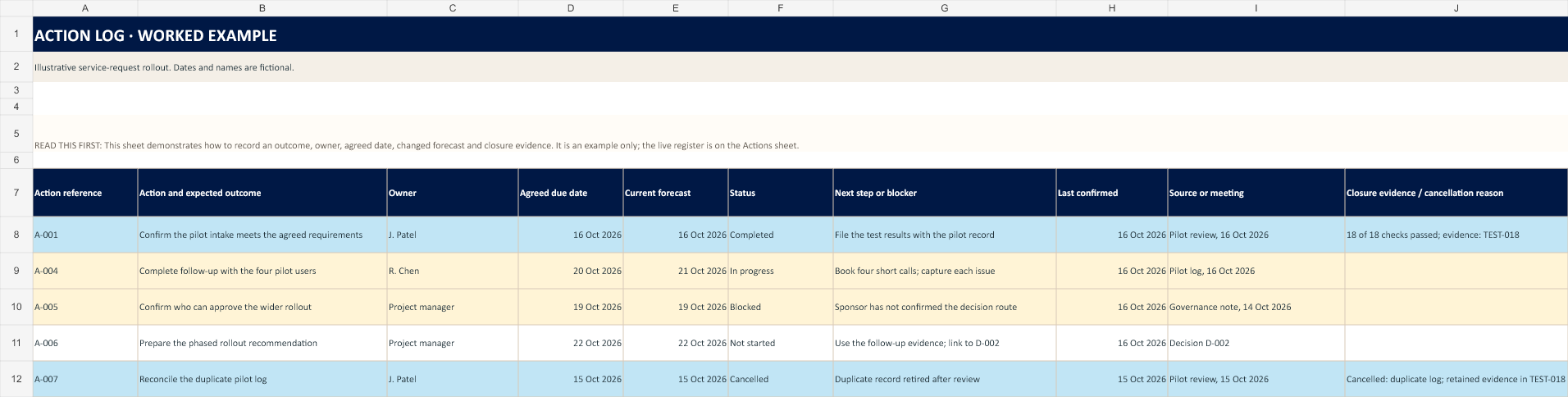
Action log
Keep each agreed action tied to a person, an agreed due date, the current forecast and the source where it was raised. Record the next step when work is blocked, and the evidence or reason when it closes.
The workbook has status choices, a few attention checks and a fictional worked example. A blank last-confirmed date stays blank; it does not mean the item is current.
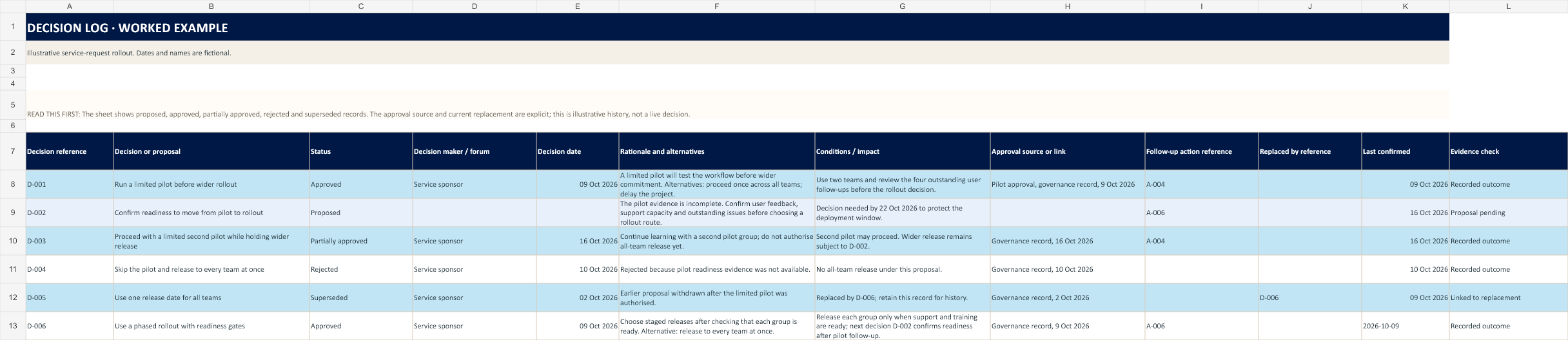
Decision log
Separate proposals from authorised outcomes. Record who decided, when, why, any conditions, and the meeting record or approval that supports it. Link superseded choices to their replacement.
The example includes proposed, approved, partially approved, rejected and superseded entries. Summary checks flag missing approval evidence without guessing what was agreed.
Before you use one: agree who owns the record, how often it is reviewed and where its source records live. These templates are starting points, not substitutes for your organisation’s approvals or controls.
Use with an AI assistant
Ask for a review. Keep control of the record.
These templates use clear column and field names so an AI assistant can distinguish owners, dates, status, sources and evidence. You can use the prompts with a table-capable assistant such as Microsoft Copilot or ChatGPT, where available in your account. Check the result against your source records; features vary by plan and environment.
Review an action log
Attach the workbook and any source records you are authorised to share. Ask:
Review the action log and the source records I provide. Do not edit the workbook. Do not invent owners, dates, status, progress or evidence. Return: (1) possible inconsistencies as a table with action reference, field, current value, suggested check, and exact source; (2) items blocked or overdue as recorded, with the recorded reason; (3) blank or stale fields that need owner confirmation. Keep agreed due dates separate from current forecasts. Mark anything you cannot verify as “unknown”.
Check a decision log
Use only approved records that you are authorised to share. Ask:
Review the decision log against the source material provided. Do not change the log or treat a proposal as an approval. List each decision reference with its recorded status, decision maker, date, rationale, conditions and source. Flag any missing or conflicting evidence and quote the source location. Keep your suggested corrections separate from the official record. If the source does not answer a question, write “not found in the material provided”.
Draft a weekly update
Give the assistant the records for the reporting period. Ask:
Draft a concise weekly project update using only the records I provide for [period]. Use these headings: overall position, progress this period, next milestone, key risks or blockers, decisions needed, and changes to the forecast. For every material statement include its source or record reference. Preserve the difference between an agreed date and a forecast. Do not calculate or infer RAG, progress, approval or completion where the source does not state it. Put open questions in a separate “Needs confirmation” list and leave them for me to resolve.
Protect project information
Use only an AI service and account approved for the information involved. Do not upload client-confidential, personal or commercially sensitive material to a public AI service. Replace names and identifiers with placeholders where appropriate. Check every statement and source before sharing the output; a human remains responsible for the record and the report.
Keep working through it
Choose a guide for the next step.
Prepare a clearer update
Work through a reporting example, then reuse the structure for your own project.
Reduce project reporting time →Get ready for SteerCo
Make the discussion useful by getting the right update, decision and follow-up in view.
Read the steering committee guide →Handle the people side
Explore practical prompts and next moves for difficult project conversations.
Try the People Field Guide →Choose project software
Start with the work you need to manage and the maintenance effort.
Compare tracking and reporting tools →Books for project professionals
Browse a reading list for ideas beyond the technical side of project management.
Browse the book list →Explore the full library
Browse practical articles on delivery, reporting, stakeholders and messy project work.
Browse all topics →Some linked articles contain affiliate links. I may earn a commission if you buy through those links. The templates above are free and do not require a purchase.
Have an idea for another practical resource? Send a suggestion or subscribe for new guides.